











Blog
Apple Creator Studio Update: What the New AI Tools Mean for Video Editing, Graphics and Social Media
28 October 2026
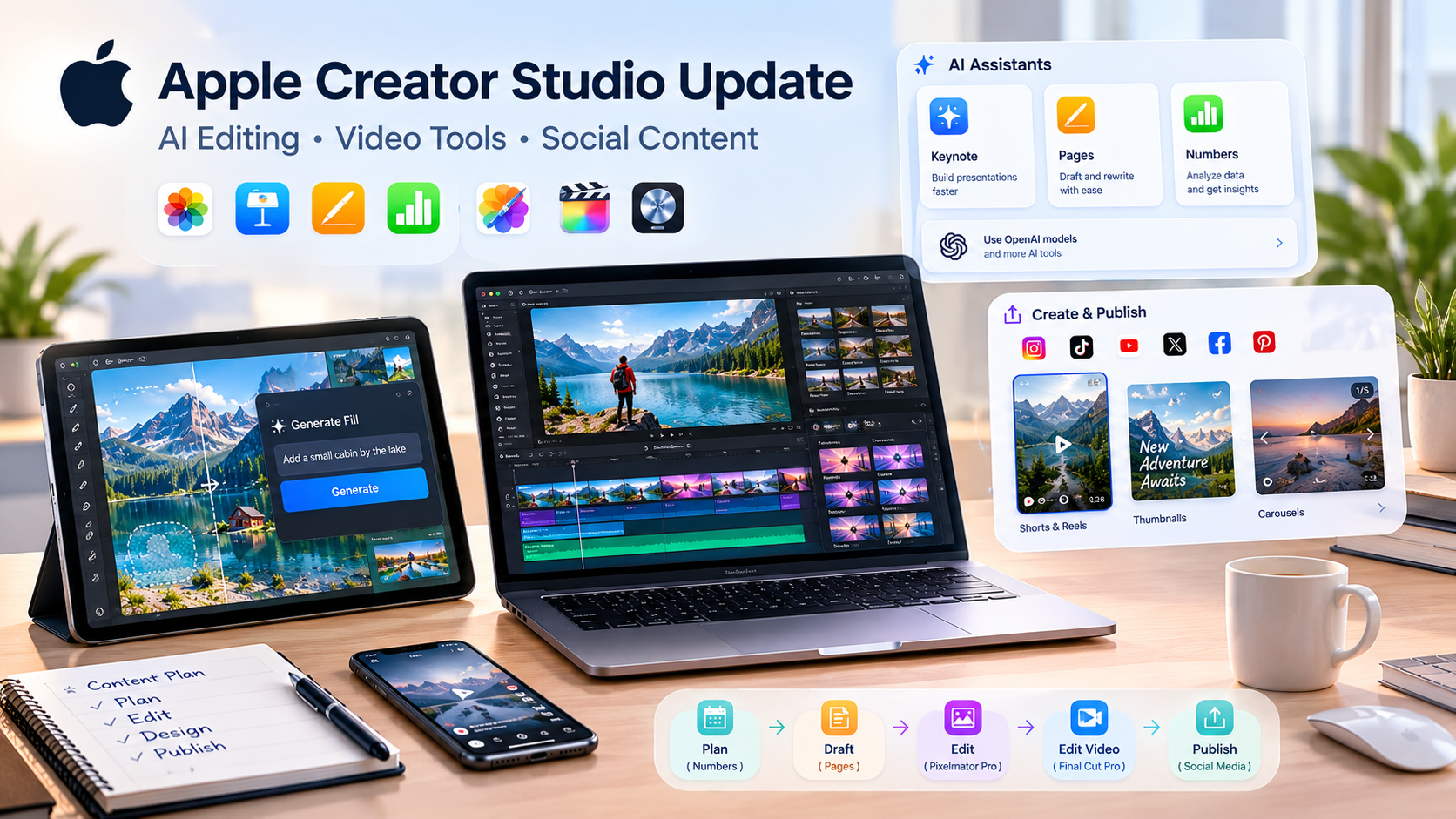
Apple Creator Studio is getting a free November update for existing subscribers. It adds an AI Generate Fill tool to Pixelmator Pro, AI assistants to Keynote, Pages and Numbers (with OpenAI model support), and thousands of MotionVFX transitions, titles, templates and effects inside Final Cut Pro. The result is faster editing, quicker graphic design and a smoother social media content workflow.
What Is Apple Creator Studio?
Apple Creator Studio is a single subscription that bundles Apple’s creative and productivity apps: Pages, Numbers, Keynote, Pixelmator Pro, Final Cut Pro and Logic Pro. It works across Mac, iPad and iPhone.
Pricing stays the same after this update:
- Standard: $12.99 per month or $129 per year
- Education: $2.99 per month or $29.99 per year
For anyone producing content regularly, one subscription covering writing, design, video and audio is attractive. The new update makes the bundle more useful because it targets the slowest parts of creative work: repetitive edits, hunting for assets and switching between apps.
Pixelmator Pro Generate Fill: A Faster Way to Edit Images
The biggest graphics news is Generate Fill in Pixelmator Pro. You select an area of an image, describe in plain language what you want there, and the AI creates it.
This is useful for jobs that normally eat up time:
- Removing a distracting object from a product photo
- Extending a background so a vertical image fits a wider banner
- Adding a missing element to a scene without a reshoot
- Cleaning up a thumbnail before publishing
Generate Fill also narrows a long-standing gap between Pixelmator Pro and Adobe Photoshop, where this kind of AI editing was already familiar. For creators who prefer Apple’s ecosystem, that means fewer reasons to leave the app.
Why it matters for graphics work: a designer no longer needs to jump between tools just to fix one part of an image. The idea, the edit and the export can all happen in one place, which shortens turnaround for logos, posters, banners and social posts.
AI Assistants in Keynote, Pages and Numbers
The three productivity apps are also gaining AI assistants:
- Keynote helps build presentations
- Pages helps draft and refine documents
- Numbers helps work with spreadsheets and data
The notable detail is model choice. You can use OpenAI models alongside Apple’s own, and the apps can work with compatible external AI tools. That flexibility makes them easier to fit into a workflow you already have.
For content teams, this is helpful behind the scenes. A content calendar in Numbers, a campaign brief in Pages and a pitch deck in Keynote can all be drafted faster. Good planning is what keeps video and graphic work organized, so even small time savings here add up.
Final Cut Pro Gets MotionVFX Content
For video editors, the headline is MotionVFX content arriving directly inside Final Cut Pro. This brings thousands of creative elements into the editor:
- Transitions
- Titles
- Templates
- Effects
Previously, editors often had to buy, download and organize third-party packs separately, or use another app to build certain effects. Having a large library inside the timeline means less file management and more time actually editing.
Why it matters for video editing:
- Speed: Browse and apply polished titles and transitions without leaving the project.
- Consistency: Reusing the same template style across a series makes your videos feel like one coherent channel or brand.
- Quality: Motion graphics that once required advanced skills become accessible to editors at every level.
- Fewer tools: One editor handling more of the job reduces export-and-import headaches.
Apple has said this arrives in November as a free update for existing subscribers, but it has not given an exact date.
How the Update Helps Social Media Content Creation
Social media rewards consistency and speed. Algorithms favor accounts that post regularly, and audiences expect fresh, polished visuals. Here is how each new feature supports that.
Short-Form Video (Reels, Shorts, TikTok-Style Clips)
Short videos need punchy titles, quick transitions and a consistent look. MotionVFX assets inside Final Cut Pro make it easier to produce that style quickly. Build one template for your intro and captions, then reuse it across dozens of clips.
Thumbnails, Posts and Carousels
Generate Fill helps you repair, extend or adjust images for different platforms. A single photo can be reshaped for a square post, a vertical story and a wide thumbnail without starting from scratch.
Planning and Reporting
Numbers can hold your posting schedule and performance data, Pages can store captions and brand voice notes, and Keynote can turn results into client-ready presentations. With AI assistance, preparing these materials takes less time.
Repurposing Content
One long video can become a dozen short clips, quote graphics and carousel slides. Having editing, design and planning tools under one subscription makes repurposing more practical.
A Simple Workflow Using the New Tools
Here is an example of how a creator or small business could combine the apps:
- Plan the month’s content in Numbers, with topics, formats and posting dates.
- Draft captions and scripts in Pages using the AI assistant.
- Shoot or collect raw footage and photos.
- Edit video in Final Cut Pro, adding MotionVFX titles and transitions.
- Fix and resize images in Pixelmator Pro using Generate Fill.
- Present results or pitch the next campaign in Keynote.
This end-to-end process keeps everything inside one ecosystem, which reduces friction.
Limitations to Keep in Mind
No toolset replaces strategy or skill. A few honest points:
- AI output needs review. Generated fills can look unnatural, so always check edges, lighting and details.
- Tools don’t create ideas. Great content still depends on a clear message and audience understanding.
- Timing is uncertain. Apple says November but has not confirmed dates.
- Learning curve. Professional-looking motion graphics and color work still benefit from experience.
When to Bring in Professional Help
Software can speed up production, but many businesses and creators don’t have the time to edit every video, design every graphic and manage every platform themselves. That is where outside support makes sense. Professional video editing and graphic design support can handle the production side, so you stay focused on running your business or creating ideas. Combined with consistent social media content and management, it keeps your channels active, on-brand and ready to grow.
Whether you do it yourself with Apple’s tools or work with a specialist, the goal is the same: polished visuals, steady posting and content people want to watch.
Final Thoughts
This Apple Creator Studio update focuses on practical value: faster image editing with Generate Fill, smarter planning and writing with AI assistants, and a much richer asset library in Final Cut Pro. For anyone creating video, graphics or social media content, it removes friction at several points in the workflow, all without raising the subscription price.
The tools help, but results still come from consistent effort and good creative decisions. Use the software to move faster, and bring in expert help when you need to scale.
Frequently Asked Questions
Apple Creator Studio is a subscription that bundles Pages, Numbers, Keynote, Pixelmator Pro, Final Cut Pro and Logic Pro. It works on Mac, iPad and iPhone.
The update adds Generate Fill to Pixelmator Pro, AI assistants to Keynote, Pages and Numbers, support for OpenAI models in those apps, and MotionVFX creative assets in Final Cut Pro.
Generate Fill is an AI tool that lets you select part of an image, describe the change you want, and have the AI add or alter that area automatically.
Yes. The update lets you use OpenAI models alongside Apple’s own models. The apps also support compatible external AI tools.
MotionVFX is a provider of video editing assets. Final Cut Pro is adding thousands of its transitions, templates, effects and titles directly inside the app.
In the US, it costs $12.99 per month or 129peryear.IntheUKitis£12.99permonthor£129peryear,andinAustraliaAU19.99 per month or AU$199 per year.
Yes. Education pricing is $2.99 per month or 29.99peryearintheUS,£2.99or£29.99intheUK,andAU4.99 or AU$49.99 in Australia.
Apple says the update arrives in November. It is free for existing subscribers, but Apple has not announced an exact date.
They speed up video editing, make image resizing and repair easier, and simplify planning and reporting, so you can post more consistently at a higher quality.
AI speeds up routine tasks, but strategy, creative direction and quality control still benefit from human skill. Many creators use AI tools for efficiency and professionals for polish.
